The listening cycle has been co-written by Dirk Slater from Fabriders. Dirk has two decades of experience supporting social justice movements and is a nice guy to boot. You can find him on Twitter @fabrider. You can also find the version of this article on the Fabriders site here.
Social media has changed the way we consume information. Most people will learn about world news or major events on social media before they learn about it from anywhere else. For advocacy and activist organizations it provides huge value as it allows them to get messaging out without having to get it noticed and vetted by major media outlets. However, the real power in social media is not about broadcasting but in its ability to allow advocates and activists to listen and understand campaign stakeholders and key audiences. This allows them to craft messaging that meets them where they are at.
We’ve been huge fans of the ‘Big Listening’ techniques shared by Upwell and have talked about them extensively in webinars and trainings that we’ve produced on social media. What we wanted to do in this post is present a ‘how-to’ on listening within the context of an advocacy campaign.
| This blog post will teach you how to: |
|
Identify key stakeholders in your campaign and where you can find them online.
|
|
Look for discussions either directly about or related to your issue.
|
|
Learn the vocabulary being used so that you can craft messaging that will engage stakeholders rather than alienate them.
|
How to get started:
Before using any technology it’s critical to know who your key stakeholders are in your campaign and what you would like them to do. To be clear, when we use the term ‘stakeholder,’ we are talking about the people who are impacted and/or involved in your campaign. Use the Pyramid and Half Wheel Exercise to understand who your stakeholders are and what tactics you want to use to engage them. Once you’ve identified the key stakeholders in your campaign, you know who you want to listen to online.
Next, you will need to identify what you are listening for. For this you will need to start with some brainstorming and then do some online detective work.
Using this Campaign Listening Template to capture what you find, list out the different keywords and people associated with your organization or campaign. Try to make a list of anything that someone might mention when talking about you, your organization, issue, or campaign.
| Keywords to listen to may include: |
| Organization(s) involved |
Spokespeople for or against the issue |
| Executive Director or CEO |
Names of campaigns, propositions, or programs that you support |
| Key leader(s) of the campaign |
Events, protests, or actions that you’ve been a part of |
| Any #hashtags you’ve created or used frequently to contribute to online dialogue about your cause. |
The Campaign Listening Matrix Template was developed as a collaboration between Aspiration and Fabriders. We used our combined past experience of working with campaigners and listening online to inform the development of this document. That said, it has not yet been tested in the wild. Try it out and let us know how it is useful to you or how you have tweaked it to work better for your campaign.
We’ve put together this Example Campaign Listening Matrix to help show how you might fill the template out for your own campaign.
You may have keywords you want to listen to online that don’t quite fit into the categories on the template we’ve provided. That’s okay, list them out anyway. Each organization and campaign is different, trust your instincts.
After you’ve figured out what keywords you are listening for, look at where your stakeholders are online and notice how they are talking about your issue. You’ll want to visit and listen to stakeholders in all three groups from the half wheel exercise, allies, neutral, and opposition. Go to their websites, blogs, social media accounts, interviews, articles, and papers published online, and use the template to list out the terms they are using to talk about your issue.
As you list these out, look for the most common terms that they use. These terms are keywords, or the words that have the most significance in how they talk about things. Some organizations may need to create two keyword columns, one that lists the current vocabulary terms and the other that lists the desired terms you’d like each group to use.
Testing… testing
Now that you have some search terms, it’s worth using google on them to test out your assumptions. As you search each of the keywords, look for clues that let you know how different stakeholder groups are talking about your issue or campaign. Do the results support your assumptions? Whether yes or no, this should inform how you use the vocabulary terms in your messaging to connect with different conversations happening online.
Let’s walk through an example
If you are a sex worker advocate, and are actively promoting sex work as ‘work,’ then you would know that your allies are probably using the term “sex worker” and opposition tend to use the word “prostitute”. Neutral parties who are less clear about the terms would be using both “sex workers” or “prostitute”, interchangeably.
| Words that people use to describe sex workers give insight into their attitude, feeling, respect for the people. |
| |
Allies |
Neutral |
Opponents |
| Search Terms |
“sex worker” |
Both, “Sex worker”
or “prostitute” |
“prostitute” |
Pro Tip: If I use advanced search function, then I can specify if I want to search for results with both terms or one without the other.
In this example, if we look at both “sex worker” and prostitute – we get a huge number of results. If we wanted to find results for “sex worker” but without any use of “prostitution” that number is far lower. And if we look for “prostitute” without “sex worker” the number is way bigger. So clearly there’s a lot more work to be done on getting people to respect sex work as work – but this gives us a picture of how often the language is used on the internet.
As you learn words that your stakeholders use you can use and adjust the Campaign Listening Template to keep track of them.
Who? What? Now, Where?
The other side of the coin is to keep track of where these discussions are happening and where these stakeholders are actually talking about your issue. So once you have identified who they are in the half-wheel and pyramid exercise you can look to see where they are online.
So if you have identified new stakeholders, you’ll want to do more detective work about where they are online, and again look to see:
- Do they have a Twitter feed?
- Are they a Facebook user?
- Do they use blogs or online forums?
It’s also helpful to think about who influences your stakeholders and who they follow online.
- Where do they get their news and information from?
- Whose information are they sharing?
- What #hashtags are they using and responding to?
Update your tracking documents by keeping track of their online presence. Writing things like each group’s Twitter username down now will save you time later when from you are using different tools to listen online.
By first identifying your key stakeholders, then identifying the vocabulary they are using online to talk about your issues you are better able to keep up with the conversations that you need to be a part of. All of this better informs your ability to influence the dialog and encourage allies to engage deeper with your cause and neutral parties to become supporters. It may even inform your tactics and strategies of neutralizing the influence of people in opposition to your cause.
Where from here?
For some of the tips to engage in conversations online after you’ve been listening, check out these Social Source Commons blog posts “I’m Monitoring Social Media… Now what?” and “Pain, Passion, Fame, Fun”.
Next week we will release part 2 of the listening cycle, containing key tools you can use to make ‘listening’ easier.
We’d love to hear how listening online has helped you learn and engage your stakeholders more effectively?



 to subscribe.




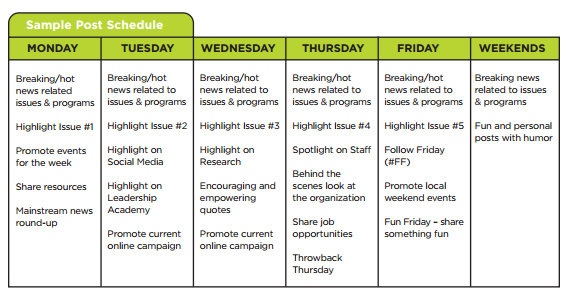
 We admire JC and Braelan, the good folks over at the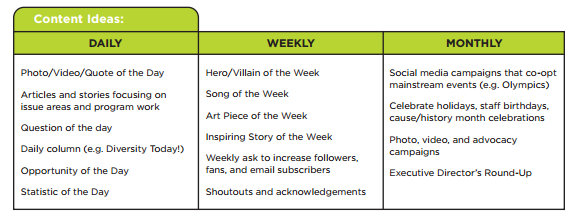


Recent Comments