
SSC Toolbox Social Source Commons Blog

Nonprofit Tech, Tools and Social Media

A program of Aspiration 
Aspiration 

How Can We Make SSC Toolboxes More Valuable for You?4uw5iwnb9lxqtrf4ros8zw6xb46qym4tHow Can We Make SSC Toolboxes More Valuable for You?

(English → Français) View original
Translators:

Toolboxes on Social Source Commons are great. We love them. Users love them. They’re selling out shows on Wednesday nights. Amazing right? Well, I know that I’ve always had tweaks and changes that I’d like to make to the toolbox interface and I’m thinking that beautiful users like yourself might as well.qktv6q8kznb24n0s8ski6ghap806hcox

We love SSC toolboxespmrpoq83xgdt4ejf3hpusbw9lq7dayvp

The current setup for toolboxes on Social Source Commons gives you some great options to talk about the tools you’re using as a nonprofit or an individual.qfgaru2s50dtxoekc9jm6mcp77om9bxp

  • Add toolszalps9vljgy2zhcr1ihute098d0dv9ql

    It wouldn’t be a toolbox if you couldn’t add tools! SSC toolboxes allow you to search for tools right inside the toolbox and add the ones that are relevant to the toolbox’s topic.sxii37veonqup36ked9njgjle9ltplf8

  • Custom Descriptions4nvecxc4vo8w42r2rqboqiqqjkqsqpmk

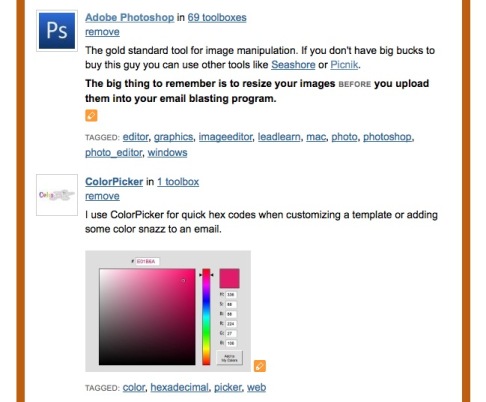
    Once your tools are in the toolbox, you can edit their descriptions (almost) any way you want. These custom descriptions only change the tool’s info within that specific toolbox. Outside of the toolbox, the tool’s description always stays the same. As a result, you can tell your story of using the tools by talking about how you’ve used them and adding links or images.jekdc0e4rhoeyn9qzfe5eebich7vu334

  • Custom Descriptions

     jm1h5gi0for8xjn92tgxygb1xcyz3xld7jlsp49s14quqrzpii1id9u5n5d5sqzpqcz05k7qsgkkxsfkysttvenqsncfnzv4

  • Add Resources & Documentationhf7ofp6hee94s7x5ewfut8ju9n93u3i2

    Other than tools, SSC Toolboxes let you link to relevant Documentation, Training, Community and Learning Resources so that people checking out your tools can get extra info that may be relevant to the toolbox’s function.2q2q7m6rwzjup957yna1gns9yiy6scck

  • Add Feeds7w3bce5dr2o4yx6ek3atlvxfakxzbpp9

    In addition, you can throw relevant RSS feeds into your toolbox as well to automatically pull in blog updates, Twitter Tweets, Facebook Page updates or anything else that may be of interest or attached to the theme of the toolbox.nl02iwmgc6w6oxsmn9aculrn4d1bjqxx

  • Toolbox Share

     jm1h5gi0for8xjn92tgxygb1xcyz3xld7jlsp49s14quqrzpii1id9u5n5d5sqzpqcz05k7qsgkkxsfkysttvenqsncfnzv4

  • Share it with the worldvb5owjzp5bf2rstwnserbcxk9qkknzb8

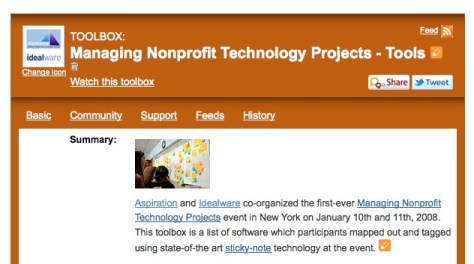
    Finally, what’s the use of a toolbox if no one knows it exists? SSC toolboxes give you a few ways to share toolboxes out with your social networks and existing audiences. With the Twitter Tweet and Identi.ca Share buttons, you can post a link to the toolbox to your stream for your followers to check out. In addition, each toolbox automatically comes with “Embed Code” so that you can embed your toolbox into the HTML of your blog, web site or online real estate.g7fvtu49hcngd0mfi4jm14rgr839u021

Ch-Ch-Ch-Changesct2wdpkr78v0p6xj0ga7nu84bap2wf5z

My motivation for changing SSC toolboxes was largely due to the layout and structure. Not satisfied with the current tab structure and other design-y issues that I think could be improved, I wanted to throw it out to all of you in the SSC Family to see if you had thoughts about the SSC toolbox, design or otherwise. Features that you would like to see, things you wish weren’t so hidden, help when implementing a toolbox… What would make SSC toolboxes more valuable for you?1cdsm7ca33ojuf566gvpmonrm3vq144t

What would YOU like to see in an SSC Toolbox redesign?ul84wg8gjbf8sax4wbwfhlfe32ttyr4j

 jm1h5gi0for8xjn92tgxygb1xcyz3xld7jlsp49s14quqrzpii1id9u5n5d5sqzpqcz05k7qsgkkxsfkysttvenqsncfnzv4

(original) View Français translation

Toolboxes on Social Source Commons are great. We love them. Users love them. They’re selling out shows on Wednesday nights. Amazing right? Well, I know that I’ve always had tweaks and changes that I’d like to make to the toolbox interface and I’m thinking that beautiful users like yourself might as well.

We love SSC toolboxes

The current setup for toolboxes on Social Source Commons gives you some great options to talk about the tools you’re using as a nonprofit or an individual.

  • Add tools

    It wouldn’t be a toolbox if you couldn’t add tools! SSC toolboxes allow you to search for tools right inside the toolbox and add the ones that are relevant to the toolbox’s topic.

  • Custom Descriptions

    Once your tools are in the toolbox, you can edit their descriptions (almost) any way you want. These custom descriptions only change the tool’s info within that specific toolbox. Outside of the toolbox, the tool’s description always stays the same. As a result, you can tell your story of using the tools by talking about how you’ve used them and adding links or images.

  • Custom Descriptions


  • Add Resources & Documentation

    Other than tools, SSC Toolboxes let you link to relevant Documentation, Training, Community and Learning Resources so that people checking out your tools can get extra info that may be relevant to the toolbox’s function.

  • Add Feeds

    In addition, you can throw relevant RSS feeds into your toolbox as well to automatically pull in blog updates, Twitter Tweets, Facebook Page updates or anything else that may be of interest or attached to the theme of the toolbox.

  • Toolbox Share


  • Share it with the world

    Finally, what’s the use of a toolbox if no one knows it exists? SSC toolboxes give you a few ways to share toolboxes out with your social networks and existing audiences. With the Twitter Tweet and Identi.ca Share buttons, you can post a link to the toolbox to your stream for your followers to check out. In addition, each toolbox automatically comes with “Embed Code” so that you can embed your toolbox into the HTML of your blog, web site or online real estate.
Ch-Ch-Ch-Changes

My motivation for changing SSC toolboxes was largely due to the layout and structure. Not satisfied with the current tab structure and other design-y issues that I think could be improved, I wanted to throw it out to all of you in the SSC Family to see if you had thoughts about the SSC toolbox, design or otherwise. Features that you would like to see, things you wish weren’t so hidden, help when implementing a toolbox… What would make SSC toolboxes more valuable for you?

What would YOU like to see in an SSC Toolbox redesign?


Connect with SSC


RSS Feed  Twitter  Facebook

Aspiration Publications