

Recently, someone asked me how to put together a link in HTML that, when clicked, took the clicker to their Twitter page with a tweet already filled in. She basically wanted an easy way to let people share her newsletter. I was putting this little color-coded guide together for her and I thought I’d turn it into a blog post. Check it.
Regular Ol’ Links
To begin, let’s review how to make a simple link in HTML. First, make sure you’re editing in HTML and not Rich Text. You’ll be able to tell because you’ll see a bunch of “<"s and ">“s everywhere. Below is a color-coded diagram of the code for an HTML link. (If you’re a newbie to HTML, remember that your code won’t be in color)
- Blue is the HTML code
- Orange is the URL where the link will go
- Black is what the link will say
Example:
Share on Twitter Links
Creating a link to automatically fill in some Tweet text is pretty simple. You just need to know some additional code to stick into the HTML link code. Let’s take a look:
To make a link that, when clicked, sends the clicker to this:
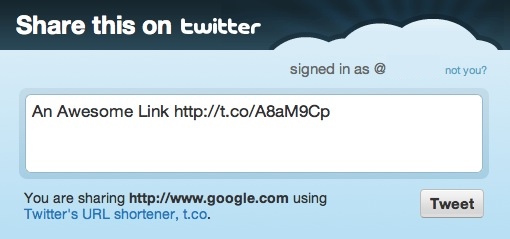
…use the following code:
Share This on Twitter</a>
- Blue is the HTML code
- Green is the code that gets Twitter to generate a tweet through a link
- Red is the text of the tweet. You can’t use spaces in this area of HTML but you can get spaces in your tweet text by typing %20 instead.
- Orange is the URL that will be included in the tweet. Twitter will automatically shorten it to save space.
- Black is what the link will say
Example:
Learn how to add #-hashtags and @-tag users with Share this on Twitter links.
Share on Facebook Links
Creating auto-share links for someone’s Facebook Wall is just as easy.
To make a link that, when clicked, sends the clicker to this:
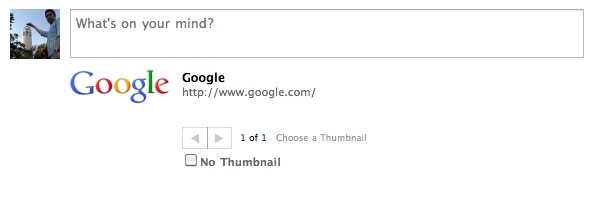
…use the following code:
Share This Link on Facebook</a>
- Blue is the HTML code
- Green is the code that gets Facebook to generate a wall post through a link
- Orange is the URL that will be attached to the post.
- Black is what the link will say
Example:
What are your favorite tricks to make your links do more?
Get more out of your Share on Twitter links with this post
Making a ‘Tweet This’ Button with # and @


This is extremely helpful! This will hopefully get more of our supporters to share our news and updates to their own networks. Thanks for looking into this!
Thanks, Lisa! I’d love to see examples of this type of thing if you end up using it in your communications further down the line, so feel free to post some links. 😀
This is really cool. It might be nice to actually include some of these links in the body of my blog posts, since I think many times the “share this” button that sits in the navigation bar or in the footer is too easily overlooked.
Definitely. I’ve been thinking lately how the “Share This” buttons that border every post, page and block have pretty much become part of the ignorable template of the website. It’d be interesting to see how many more people used the functionality if it was actually called out in the text of the post. If you play around with it, I’d love to hear what comes up!
Very well written post that explains exactly what I need. Thanks.