
SSC Toolbox Social Source Commons Blog

Nonprofit Tech, Tools and Social Media

A program of Aspiration 
Aspiration 

Creating “Share This on Facebook/Twitter” Links

(English → Italiano) View original
Translators:

Recently, someone asked me how to put together a link in HTML that, when clicked, took the clicker to their Twitter page with a tweet already filled in. She basically wanted an easy way to let people share her newsletter. I was putting this little color-coded guide together for her and I thought I’d turn it into a blog post. Check it.jgojl7w0nctwlbc0b42jq9zi2zykvhv4

Regular Ol’ Linkslf98afjuus5255246vu7seli4asxlhyx

To begin, let’s review how to make a simple link in HTML. First, make sure you’re editing in HTML and not Rich Text. You’ll be able to tell because you’ll see a bunch of “w19a4pykwlxevcr95270nfr8okodms99<"s and ">“s everywhere. Below is a color-coded diagram of the code for an HTML link. (If you’re a newbie to HTML, remember that your code won’t be in color)tfntq5ypf5aqcphtp46vael4gcrfz4zj

http://www.google.com">Google27u6tutmqa58pmocfwccgomvyl1of9s8
  • Blue is the HTML codeu6adodpuefhhw10zb7wkk5li0ws80mekvt1kn5e190gza26t1nfljd2gfykh1awmt3xrbyngetxl86x4db47ms6zdht17nrr
  • Orange is the URL where the link will gokle5t1grxrnbgdq7jekfsbv1nio2uey5
  • Black is what the link will sayxlz92tz0av5tinxojpxf4gsz3zzg031osylatckdlnv1bjdxhiz4h3j3zhpsxxlfy716cewqmmcda0jt17bzdht6719udsz1

Example:y9bzny17p5t7xqqab8za4t19eiciw5fltnyixh510f2fqm7la211zzadtj3dviiehdwwg1yfjw1973cguqvvwdkh0l5xacei

Googledykf0wwx99ru1qoku2myh21n25arc9hf

Share on Twitter Linkslyiahg7pspgk9xhm0nk6nkp6uol8gz5s

Creating a link to automatically fill in some Tweet text is pretty simple. You just need to know some additional code to stick into the HTML link code. Let’s take a look:x30vbrmgvise1n8bjvyjk4wyg0kq2vip

To make a link that, when clicked, sends the clicker to this:wg6wtn1uluqu3z6453tyew9j2ixgs4beetpm7t6e5pl3csfibbnoccdtsuqhzw74

Auto Tweet Example Screenshot

…use the following code:7ojpldfii1zj1cg2cgc5atj71hd1oaulnpap8yi9brvgwcptsry2j0hyp8kvtc86

  • Blue is the HTML codeu6adodpuefhhw10zb7wkk5li0ws80mekvt1kn5e190gza26t1nfljd2gfykh1awmt3xrbyngetxl86x4db47ms6zdht17nrr
  • Green is the code that gets Twitter to generate a tweet through a linkrep370u1hd6j4phfjg6n42j5z06b37hk
  • Red is the text of the tweet. You can’t use spaces in this area of HTML but you can get spaces in your tweet text by typing %20 instead.knkxz8q7fkfr119drtpd0zssyymdzuha
  • Orange is the URL that will be included in the tweet. Twitter will automatically shorten it to save space.1gmft9r2k75t3ckvtyjet3d27yvaspek
  • Black is what the link will sayxlz92tz0av5tinxojpxf4gsz3zzg031osylatckdlnv1bjdxhiz4h3j3zhpsxxlfy716cewqmmcda0jt17bzdht6719udsz1

Example:y9bzny17p5t7xqqab8za4t19eiciw5fltnyixh510f2fqm7la211zzadtj3dviiehdwwg1yfjw1973cguqvvwdkh0l5xacei

Share This on Twitterj5edwjfu1vsngt05g5zrnggfl2xdi7or

Learn how to add #-hashtags and @-tag users with Share this on Twitter links.y4660gxewb2cmt9zrtlg9bv79h127ckv

Share on Facebook Links9c2zsps2t0bj1njxyo4n574uqfy53h22

Creating auto-share links for someone’s Facebook Wall is just as easy.ngp1tk8kkd0mvsvky0vq8wl0shlg5wni

To make a link that, when clicked, sends the clicker to this:wg6wtn1uluqu3z6453tyew9j2ixgs4beetpm7t6e5pl3csfibbnoccdtsuqhzw74

Auto Facebook Share Example Screenshot

…use the following code:7ojpldfii1zj1cg2cgc5atj71hd1oaulnpap8yi9brvgwcptsry2j0hyp8kvtc86

  • Blue is the HTML codeu6adodpuefhhw10zb7wkk5li0ws80mekvt1kn5e190gza26t1nfljd2gfykh1awmt3xrbyngetxl86x4db47ms6zdht17nrr
  • Green is the code that gets Facebook to generate a wall post through a link368p5x05fvopmpt1zruap58jrf374bjx
  • Orange is the URL that will be attached to the post.ee4jf6etv3xwk2li75d032iorwkbjzlo
  • Black is what the link will sayxlz92tz0av5tinxojpxf4gsz3zzg031osylatckdlnv1bjdxhiz4h3j3zhpsxxlfy716cewqmmcda0jt17bzdht6719udsz1

Example:y9bzny17p5t7xqqab8za4t19eiciw5fltnyixh510f2fqm7la211zzadtj3dviiehdwwg1yfjw1973cguqvvwdkh0l5xacei

Share This Link on Facebookwlwhih32cr29y1jsvubuyg4150mf80dv

What are your favorite tricks to make your links do more?b2693vkm77cg31a4n0f1ja0tbx7lxmqz

Get more out of your Share on Twitter links with this post
Making a ‘Tweet This’ Button with # and @
ehfy0677182bprl5zc1frkcpbwqa5mi9

 5zwti91ikpakgzwq6y06gljr4z3bbwq6

(original) View Italiano translation

Recently, someone asked me how to put together a link in HTML that, when clicked, took the clicker to their Twitter page with a tweet already filled in. She basically wanted an easy way to let people share her newsletter. I was putting this little color-coded guide together for her and I thought I’d turn it into a blog post. Check it.

Regular Ol’ Links

To begin, let’s review how to make a simple link in HTML. First, make sure you’re editing in HTML and not Rich Text. You’ll be able to tell because you’ll see a bunch of “<"s and ">“s everywhere. Below is a color-coded diagram of the code for an HTML link. (If you’re a newbie to HTML, remember that your code won’t be in color)

  • Blue is the HTML code
  • Orange is the URL where the link will go
  • Black is what the link will say

Example:

Google

Share on Twitter Links

Creating a link to automatically fill in some Tweet text is pretty simple. You just need to know some additional code to stick into the HTML link code. Let’s take a look:

To make a link that, when clicked, sends the clicker to this:
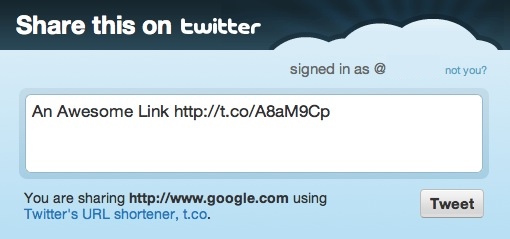
Auto Tweet Example Screenshot

…use the following code:

  • Blue is the HTML code
  • Green is the code that gets Twitter to generate a tweet through a link
  • Red is the text of the tweet. You can’t use spaces in this area of HTML but you can get spaces in your tweet text by typing %20 instead.
  • Orange is the URL that will be included in the tweet. Twitter will automatically shorten it to save space.
  • Black is what the link will say

Example:

Share This on Twitter

Learn how to add #-hashtags and @-tag users with Share this on Twitter links.

Share on Facebook Links

Creating auto-share links for someone’s Facebook Wall is just as easy.

To make a link that, when clicked, sends the clicker to this:
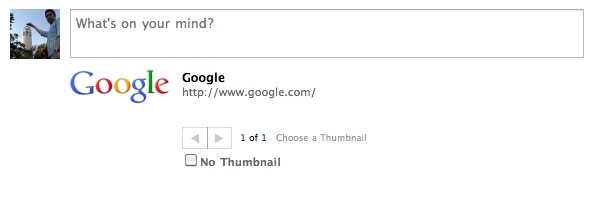
Auto Facebook Share Example Screenshot

…use the following code:

  • Blue is the HTML code
  • Green is the code that gets Facebook to generate a wall post through a link
  • Orange is the URL that will be attached to the post.
  • Black is what the link will say

Example:

Share This Link on Facebook

What are your favorite tricks to make your links do more?

Get more out of your Share on Twitter links with this post
Making a ‘Tweet This’ Button with # and @


  • http://twitter.com/Greenaction4EJ Greenaction

    This is extremely helpful! This will hopefully get more of our supporters to share our news and updates to their own networks. Thanks for looking into this!

  • http://blog.socialsourcecommons.org/ Matt Garcia

    Thanks, Lisa! I’d love to see examples of this type of thing if you end up using it in your communications further down the line, so feel free to post some links. :D

  • Anonymous

    This is really cool. It might be nice to actually include some of these links in the body of my blog posts, since I think many times the “share this” button that sits in the navigation bar or in the footer is too easily overlooked.

  • http://blog.socialsourcecommons.org/ Matt Garcia

    Definitely. I’ve been thinking lately how the “Share This” buttons that border every post, page and block have pretty much become part of the ignorable template of the website. It’d be interesting to see how many more people used the functionality if it was actually called out in the text of the post. If you play around with it, I’d love to hear what comes up!

  • http://twitter.com/UGrokIt_Carrie Carrie Requist

    Very well written post that explains exactly what I need.  Thanks.

Connect with SSC


RSS Feed  Twitter  Facebook

Aspiration Publications