
SSC Toolbox Social Source Commons Blog

Nonprofit Tech, Tools and Social Media

A program of Aspiration 
Aspiration 

Creating “Share This on Facebook/Twitter” Links

(English → Español) View original
Translators:

Recently, someone asked me how to put together a link in HTML that, when clicked, took the clicker to their Twitter page with a tweet already filled in. She basically wanted an easy way to let people share her newsletter. I was putting this little color-coded guide together for her and I thought I’d turn it into a blog post. Check it.4d5lneru5f5imngwbdam0jaqgyhs00uu

Regular Ol’ Linksqaea2pxfhydwqd9xo7x0qtnmzyhh714n

To begin, let’s review how to make a simple link in HTML. First, make sure you’re editing in HTML and not Rich Text. You’ll be able to tell because you’ll see a bunch of “bo6ghilith3sdmjg122vhmjjhy0ox2wz<"s and ">“s everywhere. Below is a color-coded diagram of the code for an HTML link. (If you’re a newbie to HTML, remember that your code won’t be in color)pau01v101utuprvk1vuy2c0721nh0zzf

http://www.google.com">Googleyasdifcsksjkxyo47gr68tnqbjgz4ons
  • Blue is the HTML codeu55avgogypqadcli8s6eemun8ryqw7ugeyr7yvgt8jw7oy2isaaaep2whd4ldzbhcrkn3cbcf9b93yxhzmwvuokiigk6tt1w
  • Orange is the URL where the link will go014ksr1qjyi03h9o4fr4s94f31r3o3ve
  • Black is what the link will say2rem9528wgbc8j20i6oxezfnhhyv46kxvcpwx871zxuqek809yfukc65qbeh12bnj7zrwe3xfp6e02kawyahamc7el5nl59u

Example:qiy1y2an0n029kep4gjnckzkk259hyvxe1km1da8e7jntoko30zqlqfy2ebl0ns4pgjokbcu2xe52mf029o99qx5i7vmgy4w

Google8mdw6gw1gp3jzp85da859m6xtrr7e11c

Share on Twitter Linksmq1gqtc062albuk9d3zpvt5lebd0gy4s

Creating a link to automatically fill in some Tweet text is pretty simple. You just need to know some additional code to stick into the HTML link code. Let’s take a look:74t454i30lizy3dtqy4llmiiwbx76hw4

To make a link that, when clicked, sends the clicker to this:98gvzzes3r2gr76uisn2csn5n7r0e8pdlqy57yy3qyqj97oep9vn6ay6gc0iodg0

Auto Tweet Example Screenshot

…use the following code:xh0s5x47pgrpaqij5k1ssepkqsyf9ijw9zi2deozunfssrilc18w5ejljgqf2os1

  • Blue is the HTML codeu55avgogypqadcli8s6eemun8ryqw7ugeyr7yvgt8jw7oy2isaaaep2whd4ldzbhcrkn3cbcf9b93yxhzmwvuokiigk6tt1w
  • Green is the code that gets Twitter to generate a tweet through a linka2f9i8wtyfmr0lema4jvix222f9ffwwf
  • Red is the text of the tweet. You can’t use spaces in this area of HTML but you can get spaces in your tweet text by typing %20 instead.tq9h4vhiv6b6fo793n3ritbvdz60vzbe
  • Orange is the URL that will be included in the tweet. Twitter will automatically shorten it to save space.7pj9p9y28n3dkozlvtpym5p41e9pjlph
  • Black is what the link will say2rem9528wgbc8j20i6oxezfnhhyv46kxvcpwx871zxuqek809yfukc65qbeh12bnj7zrwe3xfp6e02kawyahamc7el5nl59u

Example:qiy1y2an0n029kep4gjnckzkk259hyvxe1km1da8e7jntoko30zqlqfy2ebl0ns4pgjokbcu2xe52mf029o99qx5i7vmgy4w

Share This on Twitterx7xunivxtz8j9rwtek1m3m6qdy7ofqp3

Learn how to add #-hashtags and @-tag users with Share this on Twitter links.67e75l6quyzrzgpel50da5da7028lzfi

Share on Facebook Links7v8x9q8e975neji1w6jrs04khjys01bx

Creating auto-share links for someone’s Facebook Wall is just as easy.8kl5ddb4ozvkcmup7q35tfedtndfy5sx

To make a link that, when clicked, sends the clicker to this:98gvzzes3r2gr76uisn2csn5n7r0e8pdlqy57yy3qyqj97oep9vn6ay6gc0iodg0

Auto Facebook Share Example Screenshot

…use the following code:xh0s5x47pgrpaqij5k1ssepkqsyf9ijw9zi2deozunfssrilc18w5ejljgqf2os1

  • Blue is the HTML codeu55avgogypqadcli8s6eemun8ryqw7ugeyr7yvgt8jw7oy2isaaaep2whd4ldzbhcrkn3cbcf9b93yxhzmwvuokiigk6tt1w
  • Green is the code that gets Facebook to generate a wall post through a link35lnujzqh5f03ie3ev4lkli60rs7ifib
  • Orange is the URL that will be attached to the post.9wnj0g743cmrmjps1nhc0o2llcymcocc
  • Black is what the link will say2rem9528wgbc8j20i6oxezfnhhyv46kxvcpwx871zxuqek809yfukc65qbeh12bnj7zrwe3xfp6e02kawyahamc7el5nl59u

Example:qiy1y2an0n029kep4gjnckzkk259hyvxe1km1da8e7jntoko30zqlqfy2ebl0ns4pgjokbcu2xe52mf029o99qx5i7vmgy4w

Share This Link on Facebookou1jtlt05rqmsv6po2dpnojut1wntsa7

What are your favorite tricks to make your links do more?a9a7pvzlhayhxmh8jw03dyfqbjxu0tk1

Get more out of your Share on Twitter links with this post
Making a ‘Tweet This’ Button with # and @
6ugr98w3p5o2rrac0895h6dxdljn1qmy

 a97g613o1oegeilwe2e1qh9uw4lvaaxa

(original) View Español translation

Recently, someone asked me how to put together a link in HTML that, when clicked, took the clicker to their Twitter page with a tweet already filled in. She basically wanted an easy way to let people share her newsletter. I was putting this little color-coded guide together for her and I thought I’d turn it into a blog post. Check it.

Regular Ol’ Links

To begin, let’s review how to make a simple link in HTML. First, make sure you’re editing in HTML and not Rich Text. You’ll be able to tell because you’ll see a bunch of “<"s and ">“s everywhere. Below is a color-coded diagram of the code for an HTML link. (If you’re a newbie to HTML, remember that your code won’t be in color)

  • Blue is the HTML code
  • Orange is the URL where the link will go
  • Black is what the link will say

Example:

Google

Share on Twitter Links

Creating a link to automatically fill in some Tweet text is pretty simple. You just need to know some additional code to stick into the HTML link code. Let’s take a look:

To make a link that, when clicked, sends the clicker to this:
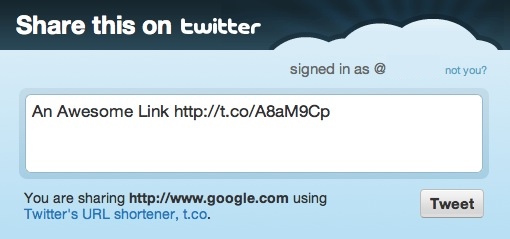
Auto Tweet Example Screenshot

…use the following code:

  • Blue is the HTML code
  • Green is the code that gets Twitter to generate a tweet through a link
  • Red is the text of the tweet. You can’t use spaces in this area of HTML but you can get spaces in your tweet text by typing %20 instead.
  • Orange is the URL that will be included in the tweet. Twitter will automatically shorten it to save space.
  • Black is what the link will say

Example:

Share This on Twitter

Learn how to add #-hashtags and @-tag users with Share this on Twitter links.

Share on Facebook Links

Creating auto-share links for someone’s Facebook Wall is just as easy.

To make a link that, when clicked, sends the clicker to this:
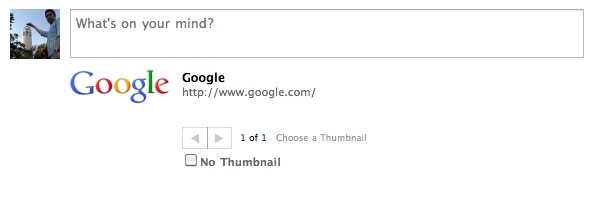
Auto Facebook Share Example Screenshot

…use the following code:

  • Blue is the HTML code
  • Green is the code that gets Facebook to generate a wall post through a link
  • Orange is the URL that will be attached to the post.
  • Black is what the link will say

Example:

Share This Link on Facebook

What are your favorite tricks to make your links do more?

Get more out of your Share on Twitter links with this post
Making a ‘Tweet This’ Button with # and @


  • http://twitter.com/Greenaction4EJ Greenaction

    This is extremely helpful! This will hopefully get more of our supporters to share our news and updates to their own networks. Thanks for looking into this!

  • http://blog.socialsourcecommons.org/ Matt Garcia

    Thanks, Lisa! I’d love to see examples of this type of thing if you end up using it in your communications further down the line, so feel free to post some links. :D

  • Anonymous

    This is really cool. It might be nice to actually include some of these links in the body of my blog posts, since I think many times the “share this” button that sits in the navigation bar or in the footer is too easily overlooked.

  • http://blog.socialsourcecommons.org/ Matt Garcia

    Definitely. I’ve been thinking lately how the “Share This” buttons that border every post, page and block have pretty much become part of the ignorable template of the website. It’d be interesting to see how many more people used the functionality if it was actually called out in the text of the post. If you play around with it, I’d love to hear what comes up!

  • http://twitter.com/UGrokIt_Carrie Carrie Requist

    Very well written post that explains exactly what I need.  Thanks.

Connect with SSC


RSS Feed  Twitter  Facebook

Aspiration Publications